Usage
The Genome-wide Data Cleaner (GDC) is a comprehensive pipeline designed for cleaning genotype data and performing advanced genomic analyses. It integrates standard quality control procedures with optional advanced features like genome remapping and ancestry estimation.
Workflow Overview
The pipeline processes input data through a structured sequence of stages:
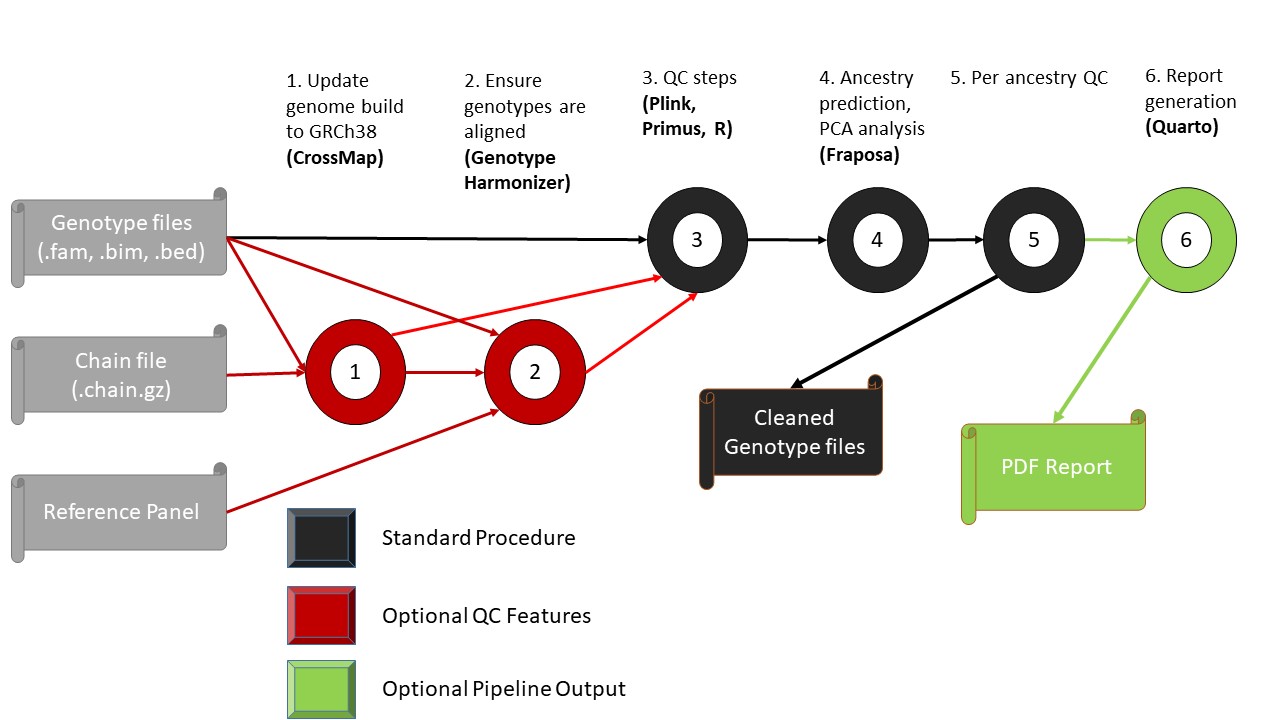
Overview of the GDC Genomics QC Pipeline stages.
Reference Update (Optional): Update genome builds from GRCh37 to GRCh38 using CrossMap.
Alignment (Optional): Ensure genotypes are aligned using Genotype Harmonizer.
Core QC Steps: Execute standard quality control filters using PLINK, Primus, and R.
Ancestry & PCA: Perform ancestry prediction and PCA analysis using Fraposa.
Per-Ancestry QC: Refine results with specific QC filters based on predicted ancestry.
Reporting (Optional): Generate a final PDF report of all QC steps and changes via Quarto.
Running the Pipeline
The pipeline is managed through a configuration file and executed via the Run.sh script.
Configuration File
Before running the pipeline, ensure your config/config.yaml file is correctly configured with project-wide paths and tool-specific parameters. A typical configuration looks like this:
# Project-wide paths
INPUT_FILE: "/projects/standard/gdc/public/Ref/toyData/1kgSynthetic"
OUT_DIR: "/scratch.global/coffm049/toyPipeline"
REF: "/projects/standard/gdc/public/Ref"

# Tool-specific parameters
relatedness:
    method: "0"
SEX_CHECK: false
RFMIX: true
thin: true
You can find the template and additional parameters in the official configuration file.
Command-Line Flags
You can append the following flags to the run command to customize the execution:
–set_working_directory: Provide the path where output files should be stored.
–input_directory: Provide the path to the directory containing your
.bim,.bed, and.famdata.–input_file_name: Provide the common prefix shared by your genotype files.
–path_to_github_repo: Provide the local path to the GDCGenomicsQC pipeline repository.
–user_x500: Provide your x500 email (e.g.,
samp213@umn.edu) to receive updates regarding sbatch submissions.–use_crossmap: Enter ‘1’ to update the reference genome build to GRCh38.
–use_genome_harmonizer: Enter ‘1’ to update strand alignment.
–use_king: Enter ‘1’ to utilize KING for relatedness estimation.
–use_rfmix: Enter ‘1’ to utilize RFMix for ancestry estimation.
–make_report: Enter ‘1’ to generate an automated report of the QC steps and changes.
–custom_qc: Enter ‘1’ to apply custom settings for marker and sample filtering.
High-Performance Computing (SLURM)
For large datasets, the script can be executed via sbatch to leverage cluster resources:
$ sbatch ./GDCGenomicsQC/Run.sh --set_working_directory $PWD --input_directory ${PWD}/input_data --input_file_name study_stem